
How Do You Choose the Best Printer for Home and Business Use?
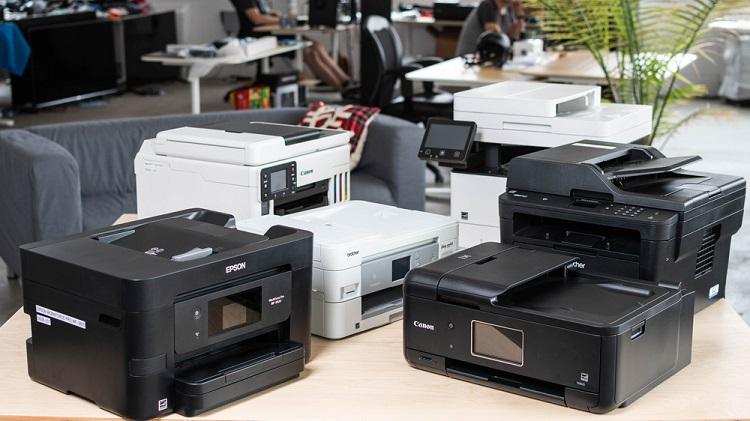
To choose the right printer, match your printing volume with the core machine type. Inkjet printers handle vibrant color photos and light home paperwork, while laser printers process fast, crisp office documents at lower cost per page. Factor in key specifications like speed, dot resolution, connectivity options, and total supply costs before buying.
In today’s technologically advanced world, printers have become an essential tool for personal and professional use. With numerous printer models and features available, selecting the right one can be daunting. From standard inkjet printers to advanced 3D printer parts in Australia, the options are vast. Fortunately, Sydney has a thriving printing industry, with specialty stores offering a wide range of models and same-day delivery options for commercial and personal needs. This article will help you navigate the process of choosing the right printer by discussing essential factors and features to consider.
What Are Your Specific Printing Needs?
Before buying a printer, review your exact workload. Decide if you need a machine for basic home tasks, high-volume office jobs, or specialized additive manufacturing.
Before diving into the world of printers, assessing your specific printing needs is crucial. Determine whether you require a printer for home use, professional use, or specialised applications like 3D printing. When considering 3D printing, you may need to research various 3D printer parts, such as extruders, heated beds, stepper motors or filament types, which can be found in Australia. By understanding your printing requirements, you can narrow your options and focus on finding a printer that meets your needs.
Inkjet Printers vs. Laser Printers: Which Is Best?
Inkjet printers use liquid ink to produce detailed, full-color photos and mixed media graphics. Laser printers use dry toner powder to output sharp text at high speeds. Choose inkjet for diverse media or photo quality, and select laser for heavy office paperwork.
Inkjet and laser printers are the two main types of printers available in the market. Inkjet printers are versatile and suitable for printing both text and images, making them an excellent option for home use. Laser printers, on the other hand, are better suited for high-volume, fast, and professional-quality text printing. Consider the type of printing you’ll do most frequently, and choose a printer accordingly.
How Important Is Printing Speed (PPM)?
Print speed directly impacts office productivity and workflow efficiency. Printers rate speed using pages per minute (PPM), with standard office models producing 20 to 45 PPM. High PPM scores help teams meet strict deadlines and handle large queues without delay.
The printing speed is an essential factor to consider, especially if you require a printer for professional use. Evaluate the printer’s pages per minute (PPM) rating, as this will give you an idea of how fast it can print. A higher PPM indicates a faster printer, which can be crucial for meeting deadlines and managing large print jobs.
How Does Print Resolution (DPI) Affect Quality?
Dots per inch (DPI) measures the visual clarity and detail of physical prints. Standard text requires 600 DPI, while professional graphics and photography demand 1200 to 4800 DPI. Higher DPI ratings ensure sharp lettering, smooth color gradients, and accurate image reproduction.
The quality of a printer’s prints is a critical aspect to consider. Look for printers with a higher dots per inch (DPI) rating, which indicates better print quality. For professional use, especially in graphic design or photography, a printer with a high DPI is essential to ensure sharp and vibrant printouts.
Which Connectivity Options Do Modern Printers Need?
Modern printers rely on flexible wireless and wired connections to serve multiple users. Standard choices include Wi-Fi 6, USB-C, Ethernet, and cloud protocols like Apple AirPrint or Wi-Fi Direct. Mobile printing lets users send jobs straight from smartphones or tablets.
In today’s digital era, having a printer with multiple connectivity options is crucial. Look for printers that support Wi-Fi, USB, and Ethernet connections for seamless integration with various devices. Some printers also offer mobile printing capabilities, allowing you to print directly from your smartphone or tablet.
What Is the True Total Cost of Ownership?
Total cost of ownership includes the retail purchase price, ongoing cartridge replacements, paper, energy, and maintenance. Average black-and-white print costs range from $0.01 to $0.03 per page, while color ranges from $0.05 to $0.14 per page. High-yield ink tanks or high-capacity laser toner dramatically lower per-page operating costs over time.
When choosing a printer, it’s essential to consider the upfront cost and the long-term cost of ownership. This includes factors like the cost of ink or toner cartridges, maintenance, and replacement of 3D printer parts in Australia. Opt for a printer with affordable consumables and low maintenance requirements to minimise the overall cost of ownership. In Australia, the average price of a high-quality laser printer ranges from $200 to $500, depending on the brand and model, with market-wide additive manufacturing investments surging past AUD 820 million as localized component production expands.
What Additional Printer Features Should You Look For?
Value-added features streamline daily document management and save paper. Look for auto-duplex two-sided printing, multi-tray feeding, integrated scanners, and touchscreen interfaces to boost daily productivity.
Some printers come with extra features that may be beneficial for your needs. These features include automatic duplex printing, multiple paper trays, and document scanning capabilities. Consider the additional features you may need and select a printer that offers them.
Selecting the right printer for your needs requires careful consideration of various factors, including your printing needs, the type of printer, speed, quality, connectivity options, cost of ownership, and additional features. By evaluating these factors, you can find a printer that meets your requirements and provides a seamless printing experience. Don’t forget to consider the availability of replacement parts like 3D printer parts in Australia, as this can impact your printer’s long-term performance and usability. You can enhance productivity and enjoy high-quality prints for years with the right printer.
To stay up to date with the latest industry shifts, explore our complete archive of technology articles and guides.
Frequently Asked Questions
What is the main difference between inkjet and laser printers?
Inkjet printers use liquid ink to print vibrant images and color documents. Laser printers use heat and toner powder to print high volumes of crisp text quickly and at a lower cost per page.
Is a higher DPI always better for printing?
Higher DPI offers better detail for photos and graphics. Standard office documents only need 600 DPI, but graphic design projects benefit from 1200 DPI or higher.
How can I lower my ongoing printing costs?
Choose high-yield cartridges, continuous ink tank systems, or laser toner. Print double-sided documents on draft mode to conserve ink and cut paper use in half.